I had discontinued this for a while... but I realize now that may be a
mistake. I'm going to be bringing this back. My intent is to start
creating a lot of video content and publish it through YouTube. All of
this will be free to use as an individual or as content if you are an
instructor or teacher. I would greatly appreciate thumbs ups for content
you find useful. I'll probably start this back up at the start of the
new year- and it'll probably get a face lift at that time as well.
Thanks for staying interested, and keep your eyes open around the end of December/start of January.
Showing posts with label multimedia11. Show all posts
Showing posts with label multimedia11. Show all posts
Thursday, November 27, 2014

Sunday, June 5, 2011
Friday, May 27, 2011
Final
Final
Even if you have a B+ for the semester, if you completely bomb the final today, you could fail for the semester. Finals are serious business. Take it seriously, it could make the difference of a letter grade for the semester, and it could make the difference between passing or not!
Your choice:
multiple choice (a through e) scantron test, built from the questions you and your peers submitted.
or
IB MYP Poster Project- rubric available
Multiple Choice Scantron
Hopefully you are prepared. Hopefully you took my advice and spoke with your peers regarding questions that they submitted for the test. If you are taking the test, you should not be using the computer. Turn it off if you decide to take the test. Best of luck!
About the poster: Read everything below
Use the rubric, use the rubric, use the rubric! It will be graded based on the rubric. Use it to make a good score; the right side of the rubric will gain you a good score, those on the left will earn you a poor/failing grade. You will turn in the poster on the flash drive that your instructor has. The file name for your poster must be your first and last name, or you will have a zero.
Challenge: Create a poster to depict a concept of the Middle Years Programme. These posters will be used in 2011-2012 as classroom references. They will be used to facilitate awareness and greater use of terminology related to programme standards. The document handed out (on the reverse side of the rubric) has three different categories, each with multiple concepts. Choose ONE of these concepts to focus on. Don't assume you know what the concept means in IB, do a little research and make sure your poster is accurate!
Criteria: Images and poster must be able to be enlarged to sizes between 16’ x 20” and 18” x 24”. Resolution of 300.
Images must NOT be copyright images.
Images MUST be free stock or public domain,
OR you must have permission by the owner.
Spelling and grammar must be accurate.
Must be easy to read without distracting graphics.
Finished product must be saved in a format allowing for future editing if needed.
Designer’s name may be located in a lower right hand corner.
Examples of Posters from the IB Store:
Areas of Interaction - 5 posters
You have the whole internet at your fingertips (well, almost). You also have very powerful software on these machines. Make use of it, create something impressive :) There are lots of things we have talked about this year, be creative. You're not limited to only whats been directly taught either, you're welcome to do a bit of your own research if you'd like.
other examples of well designed posters:
[11]
If you decide to use free stock photography, you MUST cite the works used on a document turned in with the project. Projects MUST be turned in via flash drive in an editable (.psd, .anh, etc) format. The file name of your poster MUST be your first and last name. Follow the rubric for a good grade.
Wednesday, May 25, 2011
multimedia
We are quickly approaching the end. As has already been mentioned, Thursday is my last day. Any work that is due (that would be your website) needs to be taken care of today. Any past due assignments or grades you would like changed need to be taken care of today as well. If I don't see you again today or tomorrow, have a great summer and see you next year :)
Monday, May 23, 2011
Multimedia
You have this class and next to complete your website. Any work that you haven't submitted that you would like something higher than a zero on needs to be turned in before Thursday. Nothing will be accepted after Thursday, as I will be on my way to Bahrain & Qatar.
Multimedia Final
Your choice:
10-page multiple choice (a through e) scantron test, built from the questions you and your peers submitted.
or
IB MYP Poster Project- rubric available
Multiple Choice Scantron
If you are planning on taking the multiple choice final, you and some of your peers may want to ask around for some of your classmates questions in order to create a study guide for yourself.
About the poster:
Challenge: Create a poster to depict a concept of the Middle Years Programme. These posters will be used in 2011-2012 as classroom references. They will be used to facilitate awareness and greater use of terminology related to programme standards.
Criteria: Images and poster must be able to be enlarged to sizes between 16’ x 20” and 18” x 24”. Resolution of 300.
Images must not be copyright images.
Spelling and grammar must be accurate.
Must be easy to read without distracting graphics.
Finished product must be saved in a format allowing for future editing if needed.
Designer’s name may be located in a lower right hand corner.
Examples of Posters from the IB Store:
Areas of Interaction - 5 posters
We also have some other ib-related poster design examples available for you to look at if you would like.
You have the whole internet at your fingertips (well, almost). You also have very powerful software on these machines. Make use of it, create something impressive :) There are lots of things we have talked about this year, be creative. Your not limited to only whats been directly taught either, you're welcome to do a bit of your own research if you'd like.
other examples of well designed posters:
Friday, May 20, 2011
Multimedia
For your final you have a choice:
- 10-page multiple choice scantron based on the questions submitted by you and your peers
- IB/MYP poster project for Mrs. UU
Monday, May 16, 2011
Multimedia
Continue working on your website
The school year is almost over... hopefully your project is moving along fine... as the time remaining is quickly dwindling.
In case you didn't realize it, the website I showed you last class was around 20 pages. Each picture I showed you was on a separate page. Each page was identical to the previous, with exception to the image that loaded in the center and hyperlinks attached to the arrows for the next and previous picture.
Below is an example of a map that shows the different pages created, and a simple map showing how they were linked together.

Sunday, May 15, 2011
Multimedia
Continue working on designing your website.
Don't forget you need to have a rough plan or idea on what you want your website to look like. Once you do, let me know and I'll help you figure out how to make it using tables.
Monday, May 9, 2011
Multimedia Today!
Today you should be starting on your website.
If you haven't read last classes post containing information about the assignment, that might be the best place to start. Today, during part of class, we will use the projector so that I may more easily demonstrate how the software works, and how simple to moderately comples sites are built.
First things first:
- gather the work you've created this year (export your flash animation as a .swf, export your movie as a small .mov)
- get an idea for what you'd like your website to look at (check examples in previous post)
Second:
- sketch the concept for your layout
- begin creating the needed graphics for your layout
Third:
- begin using dreamweaver to build your site.
When designing your website, keep in mind what resolution width you are designing for. The ten most used resolution sizes during 2010 are shown below. There are over 850 different resolutions, you'll want to design yours for the majority of users. Keep in mind, someone with a higher resolution typically has no problem with a lower one (users running 1280 can easily still navigate 1024).





note: We discovered on Friday that some security setting or program on our machines causes dreamweaver to not quite work the way its suppose to. If you need help because something isn't working let me know. At some points, we may have to use hand-coding due to these issues.
resources:
Thursday, May 5, 2011
Multimedia Today!
Today is the final day to work on your flash animation. Approximately half way through the period, I will come around to see and grade your animation in action. If you haven't posted 5 questions you'd like to see on the final yet, do so today. They can be over anything we've done this year (hardware, software, online apps, etc).
The Last Project
The last project we will be working on for the year is to create a portfolio of your work with dreamweaver. We will go over the software more next week. If you have finished your current project, you are welcome to start playing with it or looking stuff up for it if you so desire.
The first thing due for this project is to create a plan for what you want your portfolio to look like. This will be due Monday May 9th/Tuesday May 10th. Browse the web to get some ideas on what you may want your website to look like. You will have three weeks to work on this project. The plan should reflect a decent amount of work, but don't try for the impossible with the time we have allotted.
You will need to gather the work you've created this year for the project. You may need to spend some time gathering the work, especially if you've switched computers throughout the year. Hopefully, you've posted most the work on your blog and can find it without too much difficulty.
Also, Dreamweaver can not make graphics or images for you. You will need to make whatever images you want for your layout in a different program and then save them in JPG(recommended) or GIF format, as these are the most widely readable formats across computer types, operating systems, and browsers. You may use whatever program you would like to create imagery for your layout. Remember, any borrowed imagery from the web must be royalty free.
examples:
Notice, there is a wide range of what is reasonable. Some of them are a bit complicated and would need to be toned down a little. Some are way too complex with what you can learn in three weeks, and show long-term experience with web development.
Next class, we will discuss how the websites were constructed (or at least could be with the basis of web-design).
Off task? if so... at least do something educational...
Tuesday, May 3, 2011
Multimedia
You may continue working on your flash animation. You will have through Friday to work on it if you need. If you complete your flash animation early, begin working on your final project.
The last project, for which you will have about 3 weeks, is to design a website that will serve as a portfolio for the different things you have created this year in multimedia. We will be using Adobe's Dreamweaver software. Before you can begin creating a website, you first need to have an idea regarding the appearance you want for your portfolio website. Browse the net to get ideas and then sketch a few options. We will only be spending a few weeks on this, so avoid something overly complicated. If your not sure if an idea is doable in our time frame, ask and I will help you know what you need to in order to make that decision.
The remaining time will be spent preparing for your final. Instead of creating a final for you, I'd like to let you guys create the multiple choice final. This class or next, come up with 5 questions (+ answer) regarding material we've covered this year. Not every question is intended to be used (as it'd end up being a 250+ question test), and if there aren't enough that are quality, then I will create replacements for them.
Questions can be related to skills learned, hardware used, software used, and etc. Be creative.
Friday, April 29, 2011
Multimedia
Continue working on creating your animation in Flash.
As people begin finishing their projects next week, we will discuss the final project. Those who finish early will be allowed to start the next one, but those who need it will still have through the 6th to complete their flash project.
Wednesday, April 27, 2011
Multimedia
 Continue working on creating a flash animation. There are different ways to animate your illustration. You are also welcome to use the internet to find other resources that will help you or consult with your peers.
Additional Resources
- Flash CS4 Tutorials
- Flash CS4 Videos (goes into more than we cover)
- Flash and Actionscript Tutorials
After Flash we will also create a small project in Dream Weaver. It's a bit more user friendly than flash. Overall, it's probably the easiest of the Adobe programs.
These two projects will take us to the 25th of May. The remaining time will be spent preparing for your final. Instead of creating a final for you, I'd like to let you guys create the multiple choice final. Come up with 5 questions (+ answer) regarding material we've covered this year by the end of class Tuesday. Not every question is intended to be used (as it'd end up being a 250+ question test), and if there aren't enough that are quality, then I will create replacements for them.
Monday, April 25, 2011
multimedia
Some groups didn't complete their Work Log last week. If your group is one of these, complete it today before late penalties really hold you back. Check last weeks posts to see what is included in the completed work log.
If these are a bit basic for you, you are welcome to move ahead.
More tips and analysis regarding how groups work.
How to use layers in Flash.
Combining and transforming objects.
After following these videos, you should be able to illustrate things in Flash. However, there's still one more thing you'll need to be able to do for this project, and that's actually animate what you create. The easiest way to create motion in Flash is through tweening. You are welcome to find resources of your own, or use those on Adobe TV.
Wednesday, April 20, 2011
Multimedia
Due Today!
Getting Started in Flash
-PSA DVD
-Design Cycle Log
Read previous post for details regarding project specifications.
Whats Next?
If you haven't read this section of the previous post, do that first. After going through introductory videos, you should be able to both illustrate and animate a character in flash.
- part 4
Discusses using bitmaps vs vectors in Flash.
- part 5
Learn how to quickly and easily select multiple parts of your flash illustration.
- part 6
Learn how to create objects that wont erase those behind them, and how to group objects. At this point, you may want to redraw your flash character with this new information at hand.
Sunday, April 17, 2011
Multimedia
Your PSA is due at the end of this week (that's thursday due to the 3-day weekend). Even if you're done, watch it one last time. After having a few days away from it, you may catch things you need to improve or timing issues. Also, read you subtitles one more time, are they shown for a long enough period of time for a viewer to read the full sentence?
Whats due this week?
-PSA DVD
+ PSA must be a video in a language someone in the group is taking.
+ PSA must contain subtitles in english
+ DVD must have menus.
+ PSA DVD can only contain content created by you or that is royalty free.
-Design Cycle Log
+ Investigation Document
+ Plan Document
+ Storyboard
+ Script
+ Create Document
+ Evaluate Document
+ Collaboration Rubric
Whats Next?
This week, we will be starting Flash. What's do great about flash? A lot actually. Flash is used to create internet games (example 1 2), videos(example 1 2), and websites (examples 1 2; not all websites use flash). Of course, the understanding of flash needed to create these is much higher than you can gain in just a couple weeks, so this is just a starting point.
- part 1
Introduction to Flash.
- part 2
This video will tell you about the flash interface and workspace. It will also provide you with information regarding convenient and useful hot-keys/shortcut-keys. Try using them.
- part 3
After watching the third video, you should be able to start drawing in flash. Create a character to use in our Flash activities.
Thursday, April 14, 2011
Multimedia
Freeware Video Converter for Mac
Try to finish your video within the next week. Starting next week, we will begin discussing the final 2 projects for this school year.
Monday, April 4, 2011
multimedia
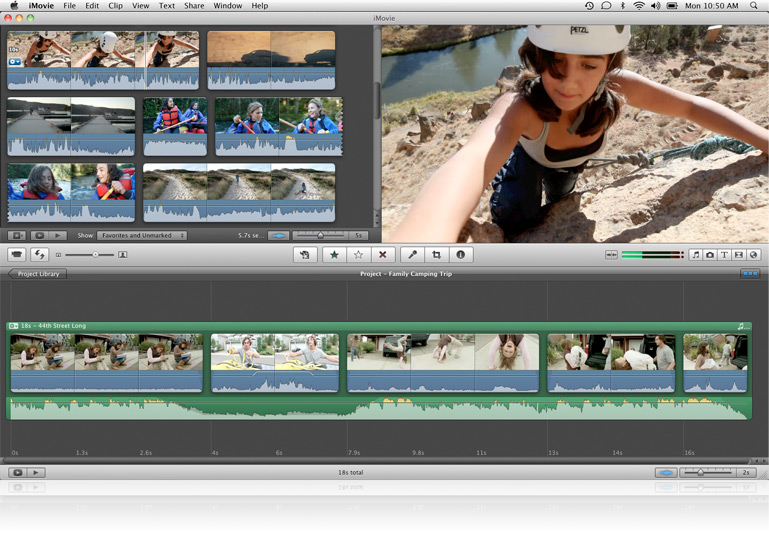 Due to testing today, we will not be filming. Use class to begin entering video segments from last class into iMovie. Take different segments from different clips/different angles to compose your scene out of multiple shots. Some of the flip cams film in avi format- and iMovie doesn't normally like avi.
Once you have the segments arranged in the way you wish, you can begin creating the subtitles. Having trouble finding copyright free music you can use? Either make your own in garageband, or check out IMSLP.
If you need any help, let me know and I will provide assistance.
If you need any help, let me know and I will provide assistance.
You are also welcome to check out Blogger's New Dynamic Views for blogs. Blogger is currently offering five dynamic views. See my blog in:
Check out New Dynamic Views to learn how to see your blog in these modes.
Thursday, March 31, 2011
Multimedia 3/31

Today we will film around the campus. Make sure you have your scripts and storyboards ready.
Hopefully you've rehearsed a bit already, as often the first couple run throughs often feel a bit uncomfortable for actors and come out a bit silly.
Subscribe to:
Posts (Atom)