I had discontinued this for a while... but I realize now that may be a
mistake. I'm going to be bringing this back. My intent is to start
creating a lot of video content and publish it through YouTube. All of
this will be free to use as an individual or as content if you are an
instructor or teacher. I would greatly appreciate thumbs ups for content
you find useful. I'll probably start this back up at the start of the
new year- and it'll probably get a face lift at that time as well.
Thanks for staying interested, and keep your eyes open around the end of December/start of January.
Showing posts with label multimedia. Show all posts
Showing posts with label multimedia. Show all posts
Thursday, November 27, 2014

Thursday, May 24, 2012
Multimedia
Check your grades! Check your blog!
Check below and see what your missing!!
Need help? Confused? Ask for help!
What should be on your Blog for this six weeks??
Self-Determined Project:
- Identify your Problem
- Design Brief
- Design Spec
- Plan
- Evaluation
- Citations
- Completed Project (If its flash, you need to show it to me)
Portfolio
- Citations
- Evaluation
- Completed Project (Can upload these to the blog, so you'll show this to me)
due first 3 weeks
due second 3 weeks
Many of you have not posted your citations or evaluations. This makes for some very sad grades!! Please fix this, so I can grade them!
ALSO!
Mrs. Lindig is collecting works of art to go on display over the summer. If you have a piece of digital work you've done that you think may qualify, let me know!
Check below and see what your missing!!
Need help? Confused? Ask for help!
What should be on your Blog for this six weeks??
Self-Determined Project:
- Identify your Problem
- Design Brief
- Design Spec
- Plan
- Evaluation
- Citations
- Completed Project (If its flash, you need to show it to me)
Portfolio
- Citations
- Evaluation
- Completed Project (Can upload these to the blog, so you'll show this to me)
due first 3 weeks
due second 3 weeks
Many of you have not posted your citations or evaluations. This makes for some very sad grades!! Please fix this, so I can grade them!
ALSO!
Mrs. Lindig is collecting works of art to go on display over the summer. If you have a piece of digital work you've done that you think may qualify, let me know!
Tuesday, May 22, 2012
Multimedia
You don't have to watch these, but for those of you wanting to expand your abilities in Dreamweaver, this may be of interest to you.
More Dreamweaver Help
Youtube Videos
- Use Dreamweaver to Create Simple Webpages google.doc link
- How to use tables in Dreamweaver google.doc link
- Advanced Tables google.doc link
- Creating Table Based Layouts google.doc link
Sorry guys, apparently youtube has been blocked again. You'll have to download the file from google.docs for now. The files are big, they may take a little while to download.
More Dreamweaver Help
Youtube Videos
- Use Dreamweaver to Create Simple Webpages google.doc link
- How to use tables in Dreamweaver google.doc link
- Advanced Tables google.doc link
- Creating Table Based Layouts google.doc link
Sorry guys, apparently youtube has been blocked again. You'll have to download the file from google.docs for now. The files are big, they may take a little while to download.
Thursday, May 17, 2012
Multimedia
Using Flash?
Other students found this tutorial here pretty helpful.
Dreamweaver Users: Another example of how a website could be broken down into how it could be reconstructed via tables.

I didn't label each and every row and column. Hopefully you're starting to catch on. You may notice in there, that sometimes there's just one column inside of a row. That's just how tables work. You cant just have a row- You have to have columns, even if that means you're only putting one column in. Of course, dreamweaver does all of that for you...
Oops! Some of the tables extend a bit further down in that picture. I didn't notice the scrollbar on the right side when drawing on the screenshot. Hopefully you get the idea though. If the image is confusing to you, let me know and I'll help you understand it better.
Dreamweaver Resources
Other students found this tutorial here pretty helpful.
Dreamweaver Users: Another example of how a website could be broken down into how it could be reconstructed via tables.

click to enlarge
I didn't label each and every row and column. Hopefully you're starting to catch on. You may notice in there, that sometimes there's just one column inside of a row. That's just how tables work. You cant just have a row- You have to have columns, even if that means you're only putting one column in. Of course, dreamweaver does all of that for you...
Oops! Some of the tables extend a bit further down in that picture. I didn't notice the scrollbar on the right side when drawing on the screenshot. Hopefully you get the idea though. If the image is confusing to you, let me know and I'll help you understand it better.
By the way, Dreamweaver can not make graphics or images for you. You will need to make whatever images you want for your layout in a different program and then save them in JPG(recommended) or GIF format, as these are the most widely readable formats across computer types, operating systems, and browsers. You may use whatever program you would like to create imagery for your layout. Remember, any borrowed imagery from the web must be royalty free.
Dreamweaver Resources
Wednesday, May 16, 2012
Multimedia
Most of you are now working on your website. If you hadn't already, make sure that you have everything on the previous project on your blog. I hadn't specifically mentioned it before, but make sure you have your evaluation of your work up as well.


We haven't really talked about product testing this year, ask me for feedback and for now we'll consider that product testing.
Creating a website
You guys should be currently working on creating a portfolio website of your work from through ought the year.
Something I wanted to mention is tables. If you are working on a website in dreamweaver, tables are a new or some-what experienced web designer's best friend. Tables are an easy way for new or moderately experienced web designers to build website layouts. There are a lot of other options now too, but tables were the standard with the web was first emerging, and is still a pretty widely used way of creating a layout. There are a lot of people who speak out against it now, and with some of the newer software, there are other options. I wouldn't recommend newer methods for new / amateur web designers (or students just starting to play with these ideas).
A table is composed of rows and columns. Rows go side to side (left to right), and columns are vertical (up to down). Basically, a table is a bunch of boxes. Tables don't have to look like boxes though, the boxes can be invisible. The shape a position of these boxes can be used to contain different things. Sort of like a giant book case, dresser, or entertainment system- a bunch of boxes to organize and contain your things.
To create a website layout with tables, you'll need to use the insert menu in dreamweaver to insert a table. If you highlight multiple cells with your cursor, you can merge cells. Just about any website layout can be create with a table.
Lets look at how my blog could be broken down into a simple table.

I'll show more examples later.


We haven't really talked about product testing this year, ask me for feedback and for now we'll consider that product testing.
Creating a website
You guys should be currently working on creating a portfolio website of your work from through ought the year.
Something I wanted to mention is tables. If you are working on a website in dreamweaver, tables are a new or some-what experienced web designer's best friend. Tables are an easy way for new or moderately experienced web designers to build website layouts. There are a lot of other options now too, but tables were the standard with the web was first emerging, and is still a pretty widely used way of creating a layout. There are a lot of people who speak out against it now, and with some of the newer software, there are other options. I wouldn't recommend newer methods for new / amateur web designers (or students just starting to play with these ideas).
A table is composed of rows and columns. Rows go side to side (left to right), and columns are vertical (up to down). Basically, a table is a bunch of boxes. Tables don't have to look like boxes though, the boxes can be invisible. The shape a position of these boxes can be used to contain different things. Sort of like a giant book case, dresser, or entertainment system- a bunch of boxes to organize and contain your things.
To create a website layout with tables, you'll need to use the insert menu in dreamweaver to insert a table. If you highlight multiple cells with your cursor, you can merge cells. Just about any website layout can be create with a table.
Lets look at how my blog could be broken down into a simple table.

click image to enlarge
I'll show more examples later.
Wednesday, May 9, 2012
Quiz Grade
I'm not here most of the day (wednesday- helping with field trip, thursday- helping with eoc's). That means today is a quiz grade. Forgot to do this last time we were testing as I didn't have an actual sub. Evidence that you show me (+ sub feed back) of what you got done today will count as a Quiz Grade!
Some of you are behind, and didn't turn stuff in last three weeks.You can still pass the six weeks, and you still hold around ~45% of your grade for the semester in your hands between the six weeks and the final. Be productive and you can succeed.
Monday, May 7, 2012
All the Pisces are Set


As stated, the final project is to create a portfolio of your work from the year. You may use Dreamweaver or Flash to do this. If you're thinking 'Hey, we haven't learned dreamweaver!' then you would be correct. Dreamweaver is used to create websites, so we don't really mess with it in Multimedia... until the end of the year.
Don't get too ahead of yourself though, we still need to finish the current project, but knowing about what's next may help you decide how to budget your time. Still to be graded for current project:
-Finished Product
-Evaluation
-Bibliography

If you've decided you've had enough Flash, I'll help groups of students ready to learn DreamWeaver as you guys are ready. It's not terribly difficult, but can be tedious at times. If you decide you like DreamWeaver and want to learn more of it, take WebMastery, or take Digital Design if you just want a little more DreamWeaver but also want to learn other Adobe programs not in this class.
Whether Flash or DreamWeaver, you will need to gather up all your work from the year. This may be from your computer, or it may be from your blog. If you've kept your work up all year, gathering your work should be pretty easy.
Tuesday, May 1, 2012
Multimedia
Progress Report Grades are due this Friday!
This Friday afternoon I'll be looking for your plan on your blog. That means... your plan is due Friday.
Your problems and design briefs have also been graded. Blogger's comment feature was working fine yesterday, but has broken again (or our servers aren't cooperating with them). So, 8th period has no comments for theirs currently. If you have a question about your's, let me know.
This Friday afternoon I'll be looking for your plan on your blog. That means... your plan is due Friday.
Your problems and design briefs have also been graded. Blogger's comment feature was working fine yesterday, but has broken again (or our servers aren't cooperating with them). So, 8th period has no comments for theirs currently. If you have a question about your's, let me know.
Saturday, April 21, 2012
Design Specification
If you had your design brief posted, then I've most likely commented on it. If you don't have a comment, you might want to ask about it. There were a couple blogs that gave error codes when trying to comment. Blogger is having an error code for some of you. If so, I'll come see you. If you have any questions, come ask or speak up as I'm walked around.
As you continue your self determined project, and our more in-depth look at the IB design cycle. The next step is the design specification.
A Design Specification should be based on information gained from the investigation. It is a list of requirements that your design ideas must meet plus a list of constraints, or limiters. It is a sort-of check list that you use when designing, planning, and creating.
After your research you can develop a Design Specification. It should tell the reader:
Example 1
Test: I could test my clock by;
Example 2
General: - Will be 'hand' size. (120x120x20 approx)
- Will be made in the time given. (5-6 weeks)
- Will be made from the materials provided.
- (Softwood, acrylic, plywood, MDF)
Function (How it works)
- Must be either a maze or a 'ball in the hole' type of game.
- Must be an appropriate difficulty level for the age group.
- Must have at least one ball
Aesthetics: (the looks)
- Should be appealing for the target market.
- Should look 'well made'
Safety:
- Must have no splinters
- Must have not sharp edges or points
- Must be made from non-toxic materials
Quality:
- The ball should roll freely and not get caught.
- Needs to be well made and of good construction
- Needs to be durable, tough and hard wearing
- Should be smooth o the touch
Environmental:
- Should use the minimum amount of materials possible
- Waste kept to a minimum
- Use recycled materials wherever possible.
As you continue your self determined project, and our more in-depth look at the IB design cycle. The next step is the design specification.
A Design Specification should be based on information gained from the investigation. It is a list of requirements that your design ideas must meet plus a list of constraints, or limiters. It is a sort-of check list that you use when designing, planning, and creating.
After your research you can develop a Design Specification. It should tell the reader:
- Who are designing for (who will see/use/buy the product)
- Objective - What the successful design must do (could also indicate how well the solution is expected to work or under what conditions it will work)
- Production
- What it should look like (Size/colours/etc)
- What it should be made from
- Tools needed to make the product
- Time needed to complete the product
- How is it to be used
Two Decent Examples Follow
(notice they don't contain all required information, they'd be stronger if they did)
examples from myp-tech.wikispaces
(notice they don't contain all required information, they'd be stronger if they did)
examples from myp-tech.wikispaces
Example 1
- Must use the Quartz analogue clock movement provided.
- The movement is 55mm x 55mm x 15mm, so it must be larger that 55mm x 55mm.
- Should be smaller that 300mm x 300mm due to the size of the hands.
- Cannot be thicker that 5mm due to the length of the movement shaft.
- Should have a theme that reflects the results from my survey.
- Must be original in its design.
- Should be made from MDF, timber or acrylic as are the most suitable.
- Must be able to be made in the TIS workshop.
- Can not be too difficult to make.
- Must be cost effective to make.
- Should be easy to read.
- Should be safe. (No sharps edges, non-toxic)
- Must be able to hang on the wall securely
- Must be able to be made in the time provided.
- Must tell the time!
Test: I could test my clock by;
- Conducting a survey of my intended market
- Check that it can be read form various distances, angles and by various people.
- Ensure that it keeps accurate time by checking it against the clock on a computer.
- Check to see if the batteries can be replaced easily.
- Check that it hangs on the wall well and will not fall if bumped.
General: - Will be 'hand' size. (120x120x20 approx)
- Will be made in the time given. (5-6 weeks)
- Will be made from the materials provided.
- (Softwood, acrylic, plywood, MDF)
Function (How it works)
- Must be either a maze or a 'ball in the hole' type of game.
- Must be an appropriate difficulty level for the age group.
- Must have at least one ball
Aesthetics: (the looks)
- Should be appealing for the target market.
- Should look 'well made'
Safety:
- Must have no splinters
- Must have not sharp edges or points
- Must be made from non-toxic materials
Quality:
- The ball should roll freely and not get caught.
- Needs to be well made and of good construction
- Needs to be durable, tough and hard wearing
- Should be smooth o the touch
Environmental:
- Should use the minimum amount of materials possible
- Waste kept to a minimum
- Use recycled materials wherever possible.
Monday, April 16, 2012
Final 6 Weeks
We've just about covered everything we need to this year, minus an end of the year project (which we don't do until... the end of the year). We've used quite a bit of different software, however, you may not of been able to explore it as much as you'd like.
For this project, you get to choose what to do, with my approval. Now before you get too far ahead of yourself, make sure you continue reading the whole post, and what is required of you. You'll need to decide what you want to make, and what software you'll need to use to do it (Photoshop, Illustrator, Flash, or a mix of these). We are also going to use this to look a bit more in depth at the Design Cycle.


As we are newly moving into IB, we hadn't gone into everything with the Design Cycle yet, as many of you have never taken a Technology Class in IB. If we look at the two images above, screenshots from the IB MYP Technology Criteria, you can see where we need to start. You have two tasks due at the end of this week:
-Identify your Problem
Describe the problem and explain why it is important; how might it affect life, society, or the environment? How does the problem relate to you or your life? This should only be a few sentences.
-Develop a Design Brief
Do a bit more research before you continue to this step. Formulate and discuss questions (things you need to know) that will guide your investigation. Identify and acknowledge a range of appropriate sources of information. You will need to collect, organize, and evaluate your information, and evaluate the sources of your info as you continue your investigation.
However, the final text you submit for this is actually rather short. Write brief summary of the problem (main problem you've decided on to solve) and the appropriate response in one paragraph. The response should be a broad outline of how you intend to solve the problem, what you will create and what the design must achieve.
Good Example:
"Teenagers have very busy lives. School, family and social activities mean that being punctual is very important. I will design and make a wall clock that will be appealing for teenage girls. It will be a modern design and will be suitable for a teenage girl's bedroom. Because the design will appeal to teenage girls, them they will be more likely to look at it, read the time and therefore not be late."
Bad Example:
"I will make a football clock from plastic and print out pictures of players to use as the numbers."
examples from myp-tech.wikispaces
A Design Specification will be due next week, but your welcome to start on it earlier when you get to that point. We'll talk more about the Design Spec later, but you're welcome to research it earlier if you'd like.
For this project, you get to choose what to do, with my approval. Now before you get too far ahead of yourself, make sure you continue reading the whole post, and what is required of you. You'll need to decide what you want to make, and what software you'll need to use to do it (Photoshop, Illustrator, Flash, or a mix of these). We are also going to use this to look a bit more in depth at the Design Cycle.


(click to enlarge)
As we are newly moving into IB, we hadn't gone into everything with the Design Cycle yet, as many of you have never taken a Technology Class in IB. If we look at the two images above, screenshots from the IB MYP Technology Criteria, you can see where we need to start. You have two tasks due at the end of this week:
-Identify your Problem
Describe the problem and explain why it is important; how might it affect life, society, or the environment? How does the problem relate to you or your life? This should only be a few sentences.
-Develop a Design Brief
Do a bit more research before you continue to this step. Formulate and discuss questions (things you need to know) that will guide your investigation. Identify and acknowledge a range of appropriate sources of information. You will need to collect, organize, and evaluate your information, and evaluate the sources of your info as you continue your investigation.
However, the final text you submit for this is actually rather short. Write brief summary of the problem (main problem you've decided on to solve) and the appropriate response in one paragraph. The response should be a broad outline of how you intend to solve the problem, what you will create and what the design must achieve.
Good Example:
"Teenagers have very busy lives. School, family and social activities mean that being punctual is very important. I will design and make a wall clock that will be appealing for teenage girls. It will be a modern design and will be suitable for a teenage girl's bedroom. Because the design will appeal to teenage girls, them they will be more likely to look at it, read the time and therefore not be late."
Bad Example:
"I will make a football clock from plastic and print out pictures of players to use as the numbers."
examples from myp-tech.wikispaces
A Design Specification will be due next week, but your welcome to start on it earlier when you get to that point. We'll talk more about the Design Spec later, but you're welcome to research it earlier if you'd like.
Tuesday, April 10, 2012
Due Dates are Extremely Nigh!
This is your final week to work on your projects and assignments. Anything not turned in Friday won't be graded. Late isn't an option, as grades are due over the weekend. That's just how things fall this six weeks.
Wednesday, April 4, 2012
Multimedia
Just one more week to work on your Flash Projects.
Don't forget you need the written report to go with it. Written report should include your investigation, plan, about what you created, and the evaluation.
Having trouble with play and pause buttons?
Most people who've tried this one have gotten it to work:
How to script a button
from Easy Tutorials for Flash Actionscript 3
Need more info on buttons?
The link below doesn't walk you through it as well as some of you may like. However, if you can follow the terminology, this looks to be a very simple and elegant solution:
Flash Controls - Play/Pause Button
Don't forget you need the written report to go with it. Written report should include your investigation, plan, about what you created, and the evaluation.
Having trouble with play and pause buttons?
Most people who've tried this one have gotten it to work:
How to script a button
from Easy Tutorials for Flash Actionscript 3
Need more info on buttons?
The link below doesn't walk you through it as well as some of you may like. However, if you can follow the terminology, this looks to be a very simple and elegant solution:
Flash Controls - Play/Pause Button
Tuesday, March 20, 2012
Flash Projects
If you haven't finished the ActionScript 3 tutorial on youtube, then get to it soon.
If you've already accomplished that, then its time to start thinking about your big project.
Choices for this Project:
-Animation (needs a play and pause button)
-Flash-based Website
-Flash Game
note: the video link above shows you how to make a play and pause button, a go to start and go to end button, and merge the play and pause button. The only part I'm requiring is the play and pause button. You can merge them if you want, you can add go to start and go to end if you want, but it isn't required. There are other videos and tutorials out there as well, you don't have to use this one, I just thought it was pretty good.
You may want to look into how to play sound/music, too. It'll definitely make things more impressive. Some tutorials online use Actionscript 3 and some use Actionscript 2, you can't mix and match. Make sure you're only using one or the other. There is preference for Actionscript 3.
As with every project, you need to use all four parts of the design cycle AND document them. Look at the IB Criteria by which you will be graded, and see how to get the most points for your work. Don't forget, there are already quite a few resources in my previous posts, but there's a lot more out there! Don't feel limited to just what I provided.
As always, while you may use copyrighted material for the small learning exercises, for your finished big projects whatever you make needs to be original. You may use free stock imagery and sounds/music from free sound libraries and free music libraries.
If you've already accomplished that, then its time to start thinking about your big project.
Choices for this Project:
-Animation (needs a play and pause button)
-Flash-based Website
-Flash Game
note: the video link above shows you how to make a play and pause button, a go to start and go to end button, and merge the play and pause button. The only part I'm requiring is the play and pause button. You can merge them if you want, you can add go to start and go to end if you want, but it isn't required. There are other videos and tutorials out there as well, you don't have to use this one, I just thought it was pretty good.
You may want to look into how to play sound/music, too. It'll definitely make things more impressive. Some tutorials online use Actionscript 3 and some use Actionscript 2, you can't mix and match. Make sure you're only using one or the other. There is preference for Actionscript 3.
As with every project, you need to use all four parts of the design cycle AND document them. Look at the IB Criteria by which you will be graded, and see how to get the most points for your work. Don't forget, there are already quite a few resources in my previous posts, but there's a lot more out there! Don't feel limited to just what I provided.
As always, while you may use copyrighted material for the small learning exercises, for your finished big projects whatever you make needs to be original. You may use free stock imagery and sounds/music from free sound libraries and free music libraries.
Monday, March 19, 2012
Doodle 4 Google
Today, you may take a break from Flash

Instead, you may spend the period to creating a Doodle 4 Google. About Doodle4Google Video by the Google Doodle Artists. Google Doodle artists reminisce on their childhood paths to becoming an artist. Tuesday, March 20th is the deadline, so don't be too ambitious unless you plan on coming in during lunch, or afterschool.
The theme is "If I could travel in time, I'd visit..."
You may hand draw, use photoshop, or combine the two (requires scanning, please allot time for the slow scanner!). Click the photoshop link to find out what size to set the document at. Click here for the forms (including the template). I have paper copies if you'd like, just ask!
It is a competition, there are prizes that can be won! What if your parents don't want you to enter the competition? That's fine, you can still do the assignment if you'd like :) You can use the assignment to replace your lowest daily grade this six weeks, or in addition to your other grades, or just for fun.
To enter the competition, you will need your parent's to sign the official entry form (unless you're 18 already).
We'll continue Flash next class and discuss your project options for it at that point.
Instead, you may spend the period to creating a Doodle 4 Google. About Doodle4Google Video by the Google Doodle Artists. Google Doodle artists reminisce on their childhood paths to becoming an artist. Tuesday, March 20th is the deadline, so don't be too ambitious unless you plan on coming in during lunch, or afterschool.
The theme is "If I could travel in time, I'd visit..."
You may hand draw, use photoshop, or combine the two (requires scanning, please allot time for the slow scanner!). Click the photoshop link to find out what size to set the document at. Click here for the forms (including the template). I have paper copies if you'd like, just ask!
It is a competition, there are prizes that can be won! What if your parents don't want you to enter the competition? That's fine, you can still do the assignment if you'd like :) You can use the assignment to replace your lowest daily grade this six weeks, or in addition to your other grades, or just for fun.
To enter the competition, you will need your parent's to sign the official entry form (unless you're 18 already).
We'll continue Flash next class and discuss your project options for it at that point.
Thursday, March 8, 2012
One Year Later
We are nearing the anniversary of last year's terrible natural disaster in Japan.


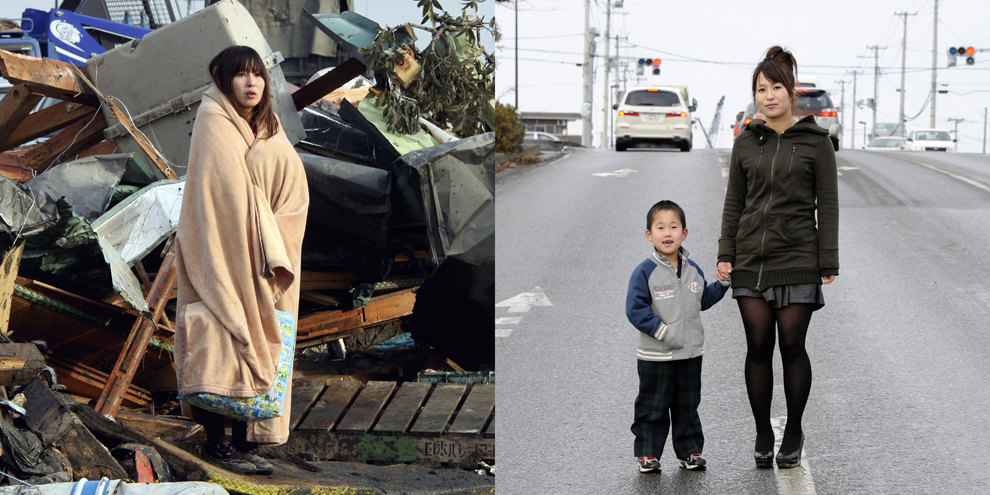
Before and After Galleries
Destruction:
Reconstruction:
(click the image to see before/after)
(click the image to see before/after)

Image's from Professional Photojournalists
Atlantic's In Focus:
Boston Globe's Big Picture
Monday, March 5, 2012
Continuing Basics of Flash
Some of you are ready to move on, and some of you are still working on the first four flash assignments (a drawing, two motion tweens, one shape tween). If you are ready to move on, then it's time to start learning a bit about ActionScript3, or how you can program things to happen in flash.
For starters, let look at something really basic.
ActionScript3 Basics Tutorial:01
I'd like to see you be able to follow along this tutorial and make a graphic behave in the ways shown in this file. He makes it really easy, follow along and you should have very little trouble.
Through this tutorial, you should be able to show me three things using actionscript,
-make an image move across the screen
-make an image jump to a specific point on the screen
-make an image follow your cursor
From here on, I'd like you to think about what you'd like to do with Flash. Possibilities include making an animation, or a website, or a game. You'll need to pick up more skills on the way to get a product you're happy with. Below are a few more tutorials that use ActionScipt3 that may aid you in this.
Cool Examples of Pro Work with Flash
More Flash ActionScript3 programming:
Create dancing letters
More Lessons in Actionscript3
Some other simple examples of ActionScript3
More Advanced
Simple Avoider Game
Create a Space Shooter
Create a Brick Breaker Game
You're welcome to look up other things that can be done with ActionScript3 as well!
For starters, let look at something really basic.
ActionScript3 Basics Tutorial:01
I'd like to see you be able to follow along this tutorial and make a graphic behave in the ways shown in this file. He makes it really easy, follow along and you should have very little trouble.
Through this tutorial, you should be able to show me three things using actionscript,
-make an image move across the screen
-make an image jump to a specific point on the screen
-make an image follow your cursor
From here on, I'd like you to think about what you'd like to do with Flash. Possibilities include making an animation, or a website, or a game. You'll need to pick up more skills on the way to get a product you're happy with. Below are a few more tutorials that use ActionScipt3 that may aid you in this.
Cool Examples of Pro Work with Flash
More Flash ActionScript3 programming:
Create dancing letters
More Lessons in Actionscript3
Some other simple examples of ActionScript3
More Advanced
Simple Avoider Game
Create a Space Shooter
Create a Brick Breaker Game
You're welcome to look up other things that can be done with ActionScript3 as well!
Monday, February 27, 2012
Continuing Flash
Today during class, I'll come around and see what you have so far. It is OK if you don't have all of your tweens created yet. I will be grading what you have completed so far. If you've finished everything so far, I'd like you to choose something to experiment with next, and show me your results later on.
Last class, we talked for a few minutes about Flash and HTML5. Find three html5 websites that impress you and link them on your blog.
Continue working on your flash assignments. By now you should have a drawing done in flash on your blog. Next step, start working with those tweens. Check the previous post for resources if you need.
Even Taco Cabana's using HTML5. Looks nice!
Work in Flash
Create a file, or files showing:
drawing- example
motion tween- change in speed example
(notice the ball goes slower at its maximum height, and faster when its near the ground)
motion tween- curved trajectory example
shape tween- example
These are only examples; you don't have to create exactly what is shown, just create something that shows the same concept. I DON'T recommend trying to recreate these exact examples. Apply some of the instructions/concepts in the previously posted videos/links.
Got this done already?
Next step is to learn a bit about ActionScript 3. They've actually got a whole manual on it! Its 128 pages... I don't think we have time for that :((( However, there are a few website out there that will walk you through creating some stuff using ActionScript 3. You'll need to make something with Flash Actionscript 3, and it doesn't have to be that hard. I'll be posting up some later.

Last class, we talked for a few minutes about Flash and HTML5. Find three html5 websites that impress you and link them on your blog.
Continue working on your flash assignments. By now you should have a drawing done in flash on your blog. Next step, start working with those tweens. Check the previous post for resources if you need.
Even Taco Cabana's using HTML5. Looks nice!
Work in Flash
Create a file, or files showing:
drawing- example
motion tween- change in speed example
(notice the ball goes slower at its maximum height, and faster when its near the ground)
motion tween- curved trajectory example
shape tween- example
These are only examples; you don't have to create exactly what is shown, just create something that shows the same concept. I DON'T recommend trying to recreate these exact examples. Apply some of the instructions/concepts in the previously posted videos/links.
Got this done already?
Next step is to learn a bit about ActionScript 3. They've actually got a whole manual on it! Its 128 pages... I don't think we have time for that :((( However, there are a few website out there that will walk you through creating some stuff using ActionScript 3. You'll need to make something with Flash Actionscript 3, and it doesn't have to be that hard. I'll be posting up some later.
Tuesday, February 21, 2012
Go Go Flash
Impressive collections of work:
Cris & Peache's Geography Game: Investigate, Plan, Create, Evaluate
Madi's Bio Game: Investigate, Plan, Pitch, Create 2, Evaluate
Adam's Chem Game: Investigate 2, Plan (on paper), Create, Eval. Write Up


Cris & Peache's Geography Game: Investigate, Plan, Create, Evaluate
Madi's Bio Game: Investigate, Plan, Pitch, Create 2, Evaluate
Adam's Chem Game: Investigate 2, Plan (on paper), Create, Eval. Write Up
New Six Weeks: Learning Flash CS4
Drawing in Adobe Flash works similar in some ways to Adobe Illustrator. If you remember how to use illustrator, drawing in Flash will be a bit easier. However, its a bit more complex, as it allows creating animations, interactivity, and can even be used to create games with the additions of scripting codes. All those online web based games you've seen, they're all flash based (well, the vast majority at least).
Can you find any really cool flash based websites? Be careful you don't get flash mixed up for HTML 5, it might be a good idea to search for Examples of Flash Websites to see some of the cool stuff pros can make it do. Post links to three cool flash websites on your blog.
If you were to get really good at flash, some of your game designs could actually become flash games. In the short period we have to work on it though, it'd be very challenging to learn action script 3 well enough.
I've collected quite a few sources for you, not that you need to watch them all. Rather, since Flash is more complicated than most of what we used this year, I wanted to make sure you had plenty of resources in case some of them didn't make since to you, were too fast, too slow, etc. Alot of these are videos, as that's just what seems most common. However, there are non-video tutorials as well. Keep in mind, you're not limited to these resources, these are just the ones I collected.

First Three Assignments in Flash:
1. Draw something in Flash
2. Make a Classic Motion Tween of:
2a - something that speeds up
2b - something that bounces along gradual arcs
3. Make a Shape Tween of:
- something transforming into something else

It's been a while since I've used flash, so I had to get reacquainted with the tools. Watching the Drawing Tutorial for Flash CS3 helped a bit, even if some of the things work a bit differently (as we're using CS4). I've created a cartoon-esque helmet. When played as a swf file (not the png screenshot I've taken of it on the left), the picture starts with just the background, then the helmet zooms into the frame. What can you make?
Additional Flash Content:
Friday, February 17, 2012
End of Six Weeks Reflection
Six weeks short reflection:
This semester is a third of the way through now. Post a bit about your thoughts on what you've done so far. Post the answers to these questions on your blog.
Do you feel this six weeks was successful for you? Why or why not? How did your work ethic affect this?
Of the two major projects we worked on this six weeks (typography & game design), which did you prefer? Tell me about your thoughts on why.
For both of these projects, you were able to choose which software you wanted to use. What did you work most in? Why did you choose this software? Was this choice based on what you preferred to use, or what you thought would work best on this project? After completing it, do you think you'd use the same software if you could go back and begin it again?
What is something you've done or learned this six weeks that you think you may be able to use beyond this class and how?
This semester is a third of the way through now. Post a bit about your thoughts on what you've done so far. Post the answers to these questions on your blog.
Do you feel this six weeks was successful for you? Why or why not? How did your work ethic affect this?
Of the two major projects we worked on this six weeks (typography & game design), which did you prefer? Tell me about your thoughts on why.
For both of these projects, you were able to choose which software you wanted to use. What did you work most in? Why did you choose this software? Was this choice based on what you preferred to use, or what you thought would work best on this project? After completing it, do you think you'd use the same software if you could go back and begin it again?
What is something you've done or learned this six weeks that you think you may be able to use beyond this class and how?
Wednesday, February 15, 2012
Final Project
Your completed projects, along with design cycle documents are due at the end of this week.
Below I've are two links from some of the more completed write ups from the previous project. With how much planning, investigating, and creating you guys have done for this project, I figure the majority of you will have much longer posts for this project. Some of you already have.
X-Box Controller Typography Project
Alice-in-Wonderland-esque Typography Project
You're writeup doesn't have to be on your blog, it can also be on paper if your prefer. Either way, this should have ensure you understand what your writing should look like. If you go back far enough on the blog, you can also see some of the previous student work to more completed design cycle write-ups from prior projects.
Are you so amazing that you've finished everything and there's absolutely nothing that can be improved upon? I'm not sure if I'd agree that theres nothing that can be improved upon. However, if you're stuck on the idea that your absolutely finished with no room for improvement, then start looking into Adobe Flash.
Adobe Flash works similar in some ways to Adobe Illustrator. However, its a bit more complex, as it allows creating animations, interactivity, and can even be used to create games. All those online web based games you've seen, they're all flash based (well, the vast majority at least)
A few Videos from Lynda.com
-getting started
-essential training
Adobe.tv
Animation Learning Guide
Below I've are two links from some of the more completed write ups from the previous project. With how much planning, investigating, and creating you guys have done for this project, I figure the majority of you will have much longer posts for this project. Some of you already have.
X-Box Controller Typography Project
Alice-in-Wonderland-esque Typography Project
You're writeup doesn't have to be on your blog, it can also be on paper if your prefer. Either way, this should have ensure you understand what your writing should look like. If you go back far enough on the blog, you can also see some of the previous student work to more completed design cycle write-ups from prior projects.
Adobe Flash works similar in some ways to Adobe Illustrator. However, its a bit more complex, as it allows creating animations, interactivity, and can even be used to create games. All those online web based games you've seen, they're all flash based (well, the vast majority at least)
A few Videos from Lynda.com
-getting started
-essential training
Adobe.tv
Animation Learning Guide
Subscribe to:
Posts (Atom)